Auto patch RDM devices
If the RDM fixture DMX address and the DMX address of the patch is not the same, you can auto-patch the fixture and send the patch DMX address via RDM to the fixture.
Requirements:
- MA Fixture is matched
- MA Fixtures is patched
- MA Fixture and RDM Fixture have the same universe
- Open the RDM devices window. Press Setup, and tap under Show at Patch & Fixture Schedule.
The Edit Setup opens. - Tap in the lower right corner at RDM devices.
The RDM devices window opens. - To select the fixture type you like to auto-patch, tap at the corresponding fixture type under Discovered RDM FixtureTypes.
The fixtures to the selected fixture type are displayed on the right side of the RDM devices window. - To select the fixture, tap at the fixture in the table on the right screen side.
- Tap Auto-Patch.
The patched DMX address will be sent via RDM to the RDM fixture. The selected fixture is auto-patched. The green check marks in the field below the fixture table indicates a successful match and patch.
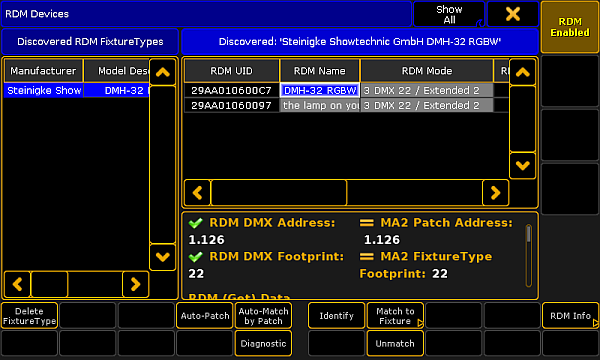
Auto-patched RDM fixture
Hint:
You can also auto-patch fixtures by using the RdmAutopatch keyword.